

Stake Vault 2026: Secure Storage, Benefits and How It Works
The Stake Vault lets you store funds safely with zero blockchain fees, instant access and multi-layer protection for smarter crypto balance management.
The Stake Vault lets you store funds safely with zero…

What Is the Stake Vault?
The Stake Vault is a secure feature within the Stake platform that allows players to store crypto funds safely. Acting as a digital vault, it eliminates blockchain delays and transaction fees, making fund management faster and more reliable. This guide explains how it protects your balance while offering seamless access.
| Storage Type | Purpose | Fees | Confirmations | Access | Security | Use Cases |
|---|---|---|---|---|---|---|
| Vault | Safely store and protect long-term funds | No blockchain fees | Requires account confirmation (email / 2FA) | Via Account > Vault menu | Password, email, 2FA | Saving funds, avoiding delays |
| Main Wallet | Used for play, betting and payments | Standard blockchain fees may apply | Blockchain confirmation required | Direct from wallet interface | Wallet security only | Deposits, withdrawals, daily transactions |
Where to Find It in the User Menu
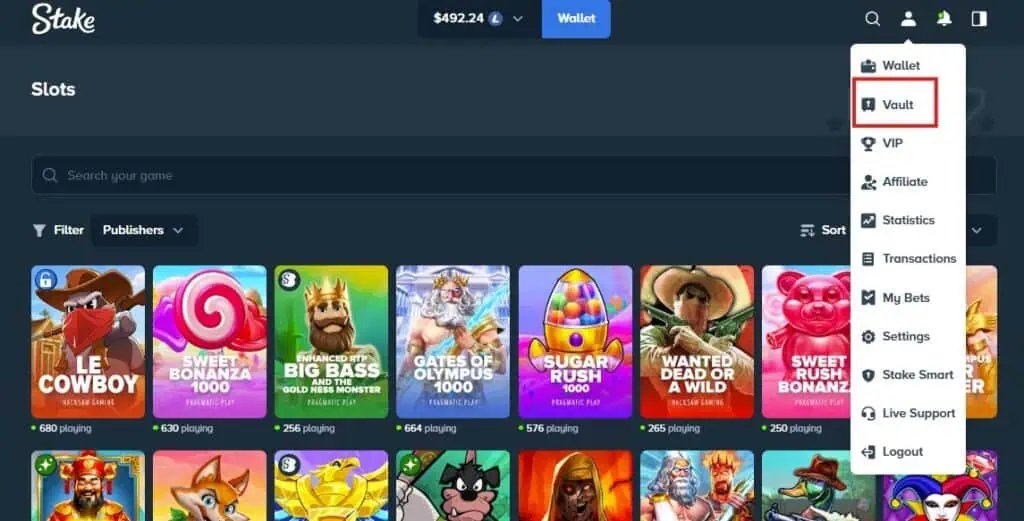
Players can access the vault through their account settings. In the user menu, simply navigate to Account > Vault. Both desktop and mobile interfaces display this option clearly, ensuring smooth access for every player.
Vault vs Main Wallet and Balance
The vault is designed to store and save funds securely, separate from your main wallet. While the main wallet supports deposits, withdrawals and gameplay, the vault ensures protected storage without blockchain fees or long confirmation time. This division helps users manage their balance more efficiently.
How to Use the Stake Vault
Knowing how to use the Stake Vault helps players store and access funds safely. By linking it to your account, the vault keeps balances secure while remaining simple to manage.
Storing Funds in the Vault
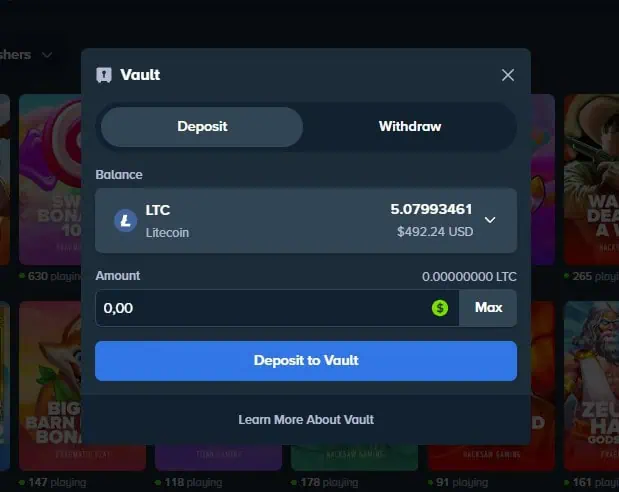
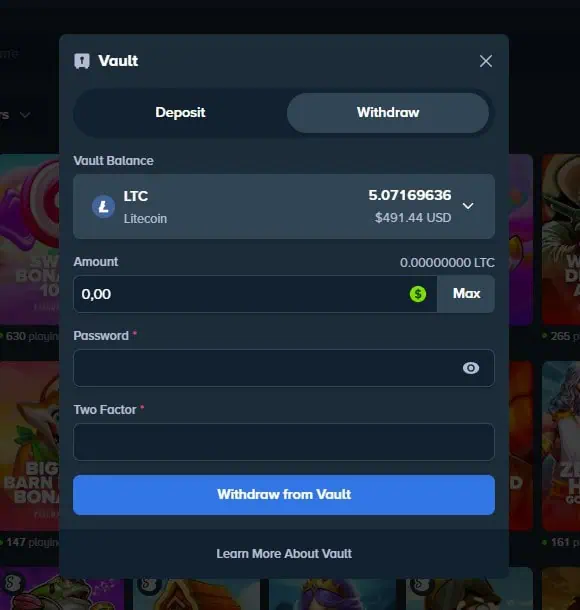
To store funds, open your account and select Vault. Enter the amount you want to move, then confirm with your password. Stake will send a confirmation to your email or request 2FA authentication.
Once approved, your funds are instantly secured in the vault, protected against blockchain delays and unnecessary fees. This ensures reliable storage with added account safety.
Withdrawing Funds from the Vault to Your Wallet
To withdraw funds, open the Vault and choose the wallet option. Transfer the desired balance by following each step carefully and double-checking the address if required.
Funds usually move back to your main wallet in real time, making them available for play or external withdrawal. For external transfers, follow the full process in the how to withdraw on Stake guide.
Benefits of Using the Stake Vault
The benefits of the Stake Vault lie in its ability to secure and store funds with maximum protection. It keeps money safe, helps eliminate blockchain fees and saves time for users who want reliable storage.
Protection and Security Measures
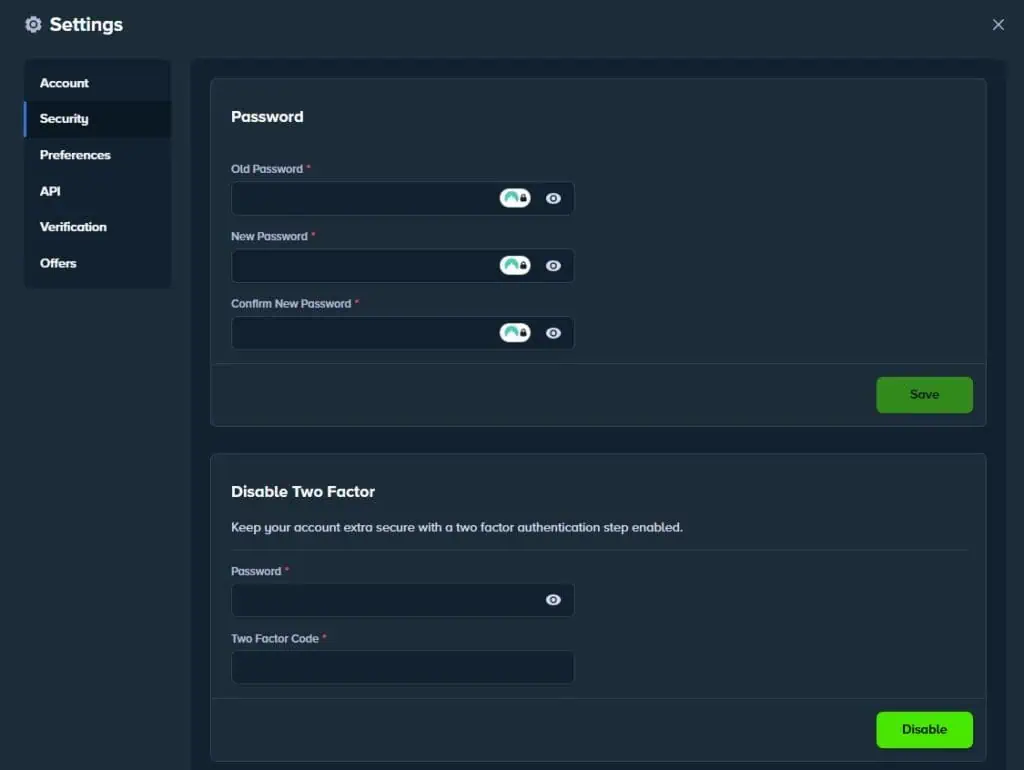
The vault applies strict security measures to guarantee complete protection. Access requires a password, verified email and 2FA verification, adding multiple factor layers to keep accounts secure. These safeguards ensure only authorized users can access stored funds.
Budgeting and Balance Management
By moving funds into the vault, players can separate their balance from everyday spending. This helps each user stay in control of their account, save funds and focus on playing more responsibly. It supports healthy gambling habits while protecting long-term storage.
How Does the Stake Vault Work?
So, how does the Stake Vault actually work? It acts as a secure and digital storage solution inside the Stake interface, allowing players to store crypto funds instantly without blockchain delays. This makes the process fast, reliableand straightforward.
Internal Ledger vs Blockchain Transactions
The vault relies on Stake’s internal ledger instead of direct blockchain processing. This eliminates extra fees, long confirmations and unnecessary time spent waiting for networks. By streamlining the process, funds move quickly between the vault and wallet without on-chain delays.
Currencies, Limits and Availability
The Stake Vault supports multiple currency types, including popular crypto like bitcoin and stablecoins. Internal limits may apply depending on your account level, but there are no restrictions on how long you can store funds. This flexibility ensures every user can manage storage according to their needs.
Security Best Practices for Vault Users
Following the right security measures helps protect your funds and keep them safe. Always enable strong authentication, update your password and link a verified email with 2FA to fully verify your account.
Setup and Confirmations Checklist
Before using the vault, complete the setup by enabling all required protections. Each confirmation step strengthens your account. Be sure to verify your email and phone, then enter each security code when prompted.
Avoiding Errors and Fraud
To ensure withdrawals remain safe, always review transaction details before confirming. Double-check amounts, avoid typos and prevent fraud by reducing risk through careful checks. Taking time to review protects your funds from errors or scams.
| Action | Location | Confirmation Required | Result |
|---|---|---|---|
| Move funds to vault | Account > Vault | Email or 2FA code | Funds stored safely without fees |
| Withdraw from vault | Vault menu | Password + confirmation code | Funds returned to wallet instantly |
| Update security | Account settings | Phone and email verification | Higher protection for stored funds |
Support and Assistance for Stake Vault
Stake offers full support to help players manage the vault. The customer support team provides assistance through official channels, while extra articles and the community on Reddit share practical experiences and answers.
How to Contact Support
Players can easily contact the Stake customer support team via live chat for instant help. For more detailed cases, email support is available, ensuring every vault question receives professional assistance.
Helpful Guides and Articles
BonusTiime regularly publishes articles and step-by-step guide updates in the news section. These resources are frequently updated with each new feature, providing a straightforward solution for users seeking extra troubleshooting.

MK is a Stake ambassador, casino streamer and author of BonusTiime’s Stake Blog. His articles are informed by experience with the platform since 2022, along with strong knowledge of the Stake environment and its development.